

Article: Layered Desk Lighting for Eye Comfort: From Flat Light to Depth
Layered Desk Lighting for Eye Comfort: From Flat Light to Depth
After a long day at work, we go home, hit the switch, and call it a day. The transition from darkness to a fully lit space takes only a second, brings instant relief, and most of the time feels good enough.
But how do we turn "good enough" into something genuinely better? Lighting plays a bigger role in everyday life than most of us give it credit for. It does more than just make things visible—it sets the tone and personality of a space, and it quietly affects eye strain, focus, and even mood over long stretches of time.
Most lighting guides focus on whole rooms, but one crucial part of the setup is still often overlooked: desk lighting. The desk is where our monitors, keyboards, and notebooks live, and it’s usually where we push our eyes the hardest—whether that’s during late‑night coding, editing, or gaming sessions.
So instead of asking “Which lamp should I buy?”, a better question is: How do I design the light around my desk so my focus lasts longer and the space actually feels good to sit in? That’s where the idea of moving from flat lighting to layered lighting comes in.
BUYING A LAMP IS NOT THE FIRST STEP
The lamp is one piece of the system, not the system itself. Before adding any new hardware, it’s worth stepping back and looking at two basics:
- where our desk stands in the room
- how we actually use our desk
Where Our Desk Stands
Where our desk stands decides not only how we reach power outlets, but also what our eyes see around the monitor by default. A very bright desk in an otherwise dark room forces our eyes to constantly switch between a bright foreground and a nearly black background, which is a common trigger for eye strain and fatigue.
Place the desk where there is room for a floor lamp, wall light, or LED strip in our peripheral vision. That extra light will help smooth out the contrast between the desk and the rest of the room. The desk can still be the brightest area, but the rest of the space should stay softly lit instead of disappearing into darkness.
How We Actually Use Our Desk
Most of the time, our desk falls into a few main modes:
- reading and writing on paper or tablets
- screen‑heavy work like coding, design, editing, or gaming
- handcrafting and other creative work that takes up more physical space
Different kinds of work call for slightly different lighting setups.
For a reading-focused setup, a compact lamp with stable, non‑flickering light is often enough. It creates a focused, eye‑friendly pool of light that keeps text clear for long stretches without turning the whole room into a spotlight.

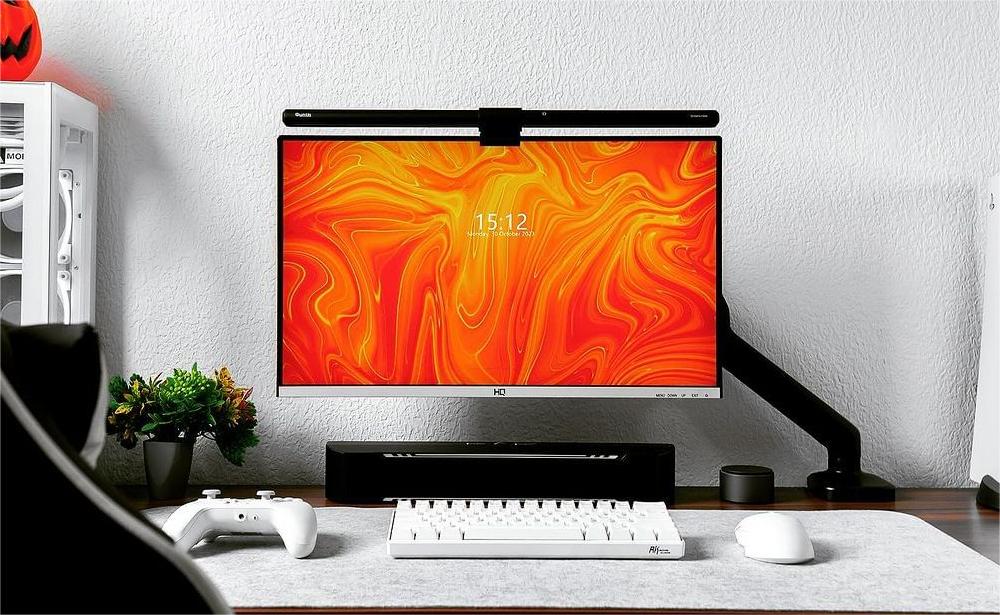
When the desk setup is more screen‑first, a single desk lamp off to one side usually isn’t ideal. It makes one half of the desk much brighter than the other, throws hard shadows across our keyboard or notebook, and can easily send glare or reflections straight onto the monitor—all of which make our eyes work harder than they need to. A better pattern for screen‑heavy desks is a light source designed around the monitor itself. That could be a monitor light bar or a long, linear desk lamp that illuminates both the desktop and the wall behind the screen, so we see a smooth gradient from screen to desk to background, instead of a bright rectangle floating in darkness.


When handcrafting or creating artwork, we usually need more horizontal space on the desktop and better lighting around tools, materials, and reference pieces. If there is no room for an extra floor lamp, a light bar that also sends light backward is an efficient way to cover both task and ambient needs with a single piece of gear. It gives us focused light on the work surface and soft “bias lighting” behind the screen or on the wall, which helps our eyes stay more relaxed during long stretches of focused work.
WHAT ACTUALLY MAKES THE DIFFERENCE?
Once we know where our desk stands and how we actually use it, the next step is to look at what our lights are actually doing. Most desk lamps come down to two core elements:
- the light source itself (brightness, color temperature, and color rendering)
- the shape of the lamp head or shade, which decides how that light spreads across the desk
The light source defines the signal: how bright the light feels, whether it reads as warm or cool, and how accurately it shows colors on our screen, paper, and objects. The shade or lamp head then decides whether that signal becomes a tight hotspot or a wide, even wash across the desktop.
Color Rendering Index and Color Temperature
Color Rendering Index (CRI) tells us how faithfully a light source reveals colors compared to natural light, on a scale from 0 to 100. For general desk work, a CRI of 80 or above is usually enough, but for design, photo, or color‑sensitive work, going higher makes it easier to judge detail and contrast without extra strain.

Color temperature describes whether the light feels warm or cool. Lower values around 2700–3000K feel warm and relaxed, while higher values around 4000K and above shift toward a neutral or slightly bluish white that feels closer to daylight.

For work that requires focus, whether we are reading, writing or going through detailed edits, a mid‑range color temperature near 4000K is a solid choice because it gives us a clear, neutral light that still feels comfortable. In the evening, shifting ambient lighting closer to 3000K can be helpful, since a slightly warmer glow reduces the harsh contrast with bright screens and makes long sessions at the computer feel easier on the eyes.

If the same desk needs to handle both focus work and late‑night computer use, a lamp or monitor light bar with adjustable color temperature gives us the flexibility to move between these two zones instead of being locked into a single setting.

Shade Shape and Light Spread
The shape of the shade and the size of its opening determine how the light spreads. A wider opening allows softer diffusion and a broader coverage area, while a narrow opening concentrates the light into a smaller, more intense spot.
Even when we use the exact same bulb, changing the shade can completely change how bright the desk feels and how far the light reaches. Long linear designs or shades with a large opening are usually better for task lighting at a desk, because they spread light across a wider portion of the surface, reduce dark corners and leave enough even light for a keyboard, notebook and paper documents.
LAYERING THE LIGHT
What is flat light vs layered light?
In many homes, desk lighting is still treated as a checkbox: we turn on one ceiling light or place one desk lamp on the table and call it done. This single‑source setup creates what we can call flat light, where brightness comes from one direction and the scene has very little depth, contrast or hierarchy.
Flat light is a simple baseline that works, but it does not give us much control over contrast or depth around the desk. With only one main source of brightness, the room tends to feel uniform and a little flat, and we miss the chance to fine‑tune contrast and depth in a way that better supports our eyes and focus.
Layered light builds on that baseline instead of replacing it. We keep the basic illumination, then add a focused task layer for the work surface and a softer halo of ambient and accent light around it. This gives us a way to steer where brightness goes, how strong the contrast feels and how “deep” the space looks, without making the room overwhelmingly bright.
The three-Layer lighting system
Most lighting designers talk about three essential layers: task, ambient and accent. Around a desk, these layers translate into a small system we can build up piece by piece.
1. Core layer: task light where we focus most
Task lighting concentrates brightness exactly where we work, on our monitor, keyboard, notebook or sketchbook, so that details stay crisp without washing out the rest of the room. A well‑designed task light balances enough brightness, a comfortable color temperature and controlled glare, so we can stay in close‑focus mode for longer stretches without discomfort.
Compared with traditional round desk lamps, a monitor light bar designed for eye comfort and monitor‑friendly lighting offers several advantages. It uses a long, linear light source that covers the full width of the desk, beam angles tuned to avoid reflections on the screen and consistent brightness that avoids hot spots and hard shadows. These elongated forms typically illuminate a wider area with more even light than compact round lamps.
2. Inner ring: ambient light around the desk
Ambient light is the soft, overall illumination that keeps the space around the desk from fading into darkness while we work. It extends across both the horizontal surface and the vertical space around our monitor, so the jump from the bright screen to the rest of the room is not so extreme. Together with the task layer, it creates a more continuous, evenly lit work area.
For desk setups, ambient lighting works best when it feels even and low‑glare, framing the workspace instead of spotlighting it. Lowering overall contrast in this way is one of the simplest methods to reduce eye strain during long reading or coding sessions.
At night, the gap between our screen and the room becomes even more noticeable. Our monitor may sit around 5000–6000K in color temperature, while the space around it slips toward darkness, creating a high‑contrast bubble that forces our pupils to keep adapting and makes even short sessions feel more tiring than they need to be.
A layered approach changes that. A warm ambient light around 3000–4000K, a dedicated task light to brighten the desk and a soft accent glow behind the monitor work together to smooth brightness transitions in our field of view, reduce eye strain and make focused work at night feel more sustainable.
3. Outer ring: Atmosphere, depth, and immersion
Accent lighting creates depth and mood around the desk. It might be a soft LED strip on the back wall, a warm glow behind the monitor or a small table lamp highlighting an object we like. Together, these lights make the space feel more immersive and personally meaningful.
A layered desk is about how light plays across the surfaces and objects we keep around us. A wall‑mounted LED strip that washes the wall behind the monitor, a floor lamp in the corner or even a small glowing ornament on a shelf can all work as accent lighting that gently frames the main work area.
These three layers together support everything that happens at a desk: work, study, creation, crafting, gaming, designing, composing and more. Lighting products from Quntis are designed to work as parts of this system, allowing any desk setup to be expanded piece by piece into a coordinated, eye‑care lighting environment, without needing to start from scratch.
On the Quntis website, all three layers of light are available and can be combined to build a setup that fits a specific desk, room and workflow. To learn more about the Quntis three‑layer lighting system, see: Inside Quntis: Desk Lighting for the Hours That Add Up
If the next step is to start or upgrade a desk lighting setup, this comparison is a useful reference: Quntis Monitor Light Bar Comparison
As a finishing touch, the objects on the desk matter too. Complementing the lighting with a few favorite pieces, such as plants, framed prints or a short stack of meaningful books, turns the desk from a simple work surface into a scene that feels inviting to return to every evening.
Ultimately, moving from flat light to layered desk lighting is less about finding a single “perfect” lamp and more about treating the desk as a small lighting ecosystem. With a thoughtful combination of task, ambient and accent lighting, plus lighting products such as a Quntis monitor light bar, it becomes much easier to build a workspace that looks good, feels gentle on the eyes and quietly supports every late‑night session at the desk.
QUICK CHECKLIST: BUILDING A LAYERED DESK LIGHTING
- Task light: A monitor light bar such as the Quntis Monitor Light Bar or a long linear desk lamp that evenly covers the keyboard and documents without creating screen glare.
- Ambient light: One ceiling light or floor lamp with soft, diffused light so the room around the desk does not fall into darkness.
- Accent light: Back‑wall LED strips, a corner floor lamp or a small table lamp that adds depth and a cozy atmosphere behind the main work area.
- Contrast control: Avoid a very bright desk in a pitch‑black room; aim for smooth brightness transitions across the field of view.
-
Color temperature: Use around 4000K for focused reading, and slightly warmer light around 3000K to soften the contrast with bright screens during nighttime work; ideally choose fixtures with adjustable color temperature.
- Visual comfort: A completely dark room with an all‑black background wall can look nice and cool, but it also tends to be more demanding on the eyes. Adding a little light to walls in direct view, avoiding a single point light source and keeping hard glare out of the line of sight are simple tweaks that can make long sessions feel easier, without changing the overall style of the setup too much.
FAQ: ABOUT LAYERED DESK LIGHTING
FAQ 1: Is a monitor light bar better than a traditional desk lamp?
A monitor light bar is not automatically “better,” but it does solve several problems common to modern desk setups, such as limited desk depth, larger monitors, and the need to reduce reflections. Products like Quntis Monitor Light Bars are designed to deliver focused task lighting for monitor users while preserving screen clarity and keeping the work surface evenly lit.
FAQ 2: How bright should desk lighting be at night?
Desk lighting at night should be bright enough to read comfortably without squinting while still allowing the rest of the room to be visible. If the screen looks like a spotlight against a black background, ambient and accent lighting are too weak; strengthening those layers usually helps more than pushing the task light to maximum brightness.
FAQ 3: Can layered lighting really improve productivity?
Layered lighting cannot replace good time management or healthy work habits, but it does remove a common source of friction: visual discomfort. When the eyes feel less strained and the workspace feels more inviting, it becomes easier to stay in the flow, especially during long evenings at the desk.
Leave a comment
This site is protected by hCaptcha and the hCaptcha Privacy Policy and Terms of Service apply.