

Article: The 3:1 Rule: How to Eliminate Nighttime Eye Strain at Your Desk
The 3:1 Rule: How to Eliminate Nighttime Eye Strain at Your Desk
This article introduces the 3:1 Rule for ergonomic lighting and explains why nighttime computer work often feels harsher on your eyes than daytime screen time. It also shows how adjusting ambient and task lighting—especially with an asymmetric monitor light bar—can narrow the contrast gap and make evening desk work more comfortable.
Why Ceiling Lights Fail After Dark (Task Lighting Fixes It)
When the sun sets, the physics of your workspace changes. During the day, natural light provides a balanced, diffused environment. At night, we transition to artificial sources that often fail to meet the biological needs of our eyes. If you experience "gritty" eyes, headaches, or a loss of focus after 8:00 PM, your current setup is likely out of sync with the 3:1 Rule.
The Science of the "Contrast Gap"
Naturally, the first instinct for most of us is to simply reach for the light switch. However, not all light is created equal when it comes to screen-based work.
The Role of Ambient vs. Task Lighting
Ceiling lights are essential. They are designed for "ambient lighting"—providing safety, visibility, and a sense of space for an entire room. However, when your focus shifts to a digital screen, the way your eyes interact with light changes.
While a ceiling light is excellent for general activities, it often reaches a technical limit when used for high-focus desk work:
The Shadow Obstacle
Because ceiling fixtures are typically positioned to light the center of a room, your body often sits between the light source and your desk. This creates a subtle but persistent shadow over your keyboard and documents, forcing your eyes to adjust to uneven light levels.
Unintended Reflections
Most monitors are designed to be viewed in controlled lighting. High-positioned bulbs often create "veiling glare" on the screen surface. This doesn't just wash out colors; it forces your ocular muscles to work harder to "see through" the reflection to the text beneath.
Localized Contrast
Bridging the Gap: The Light Bar Solution
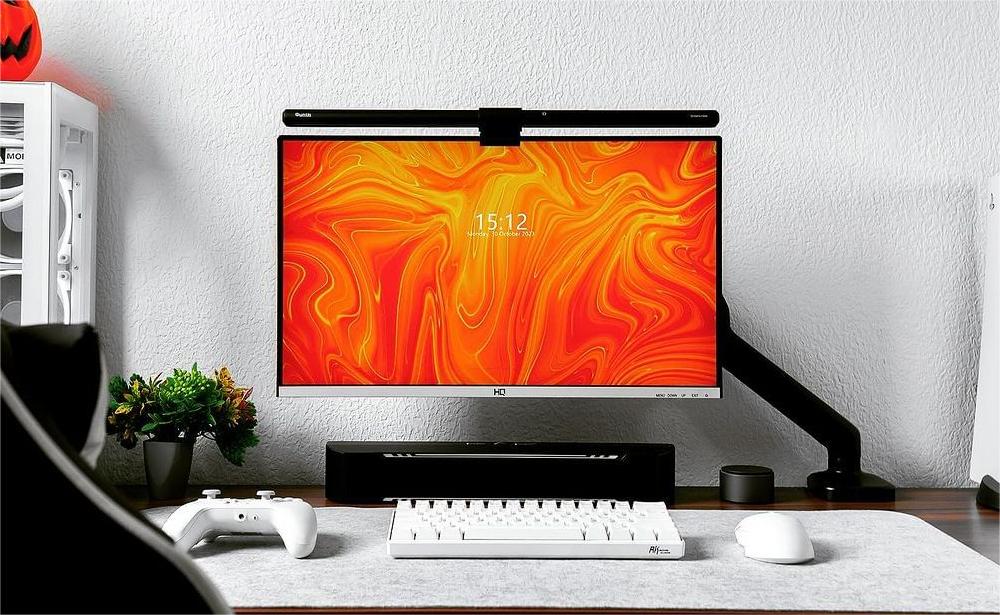
To better follow the 3:1 Rule, you generally need localized task lighting. A computer monitor light bar doesn't compete with your screen; it supports your eyes by "filling the void." By illuminating the desk surface and the area directly surrounding the monitor, it raises the ambient brightness of your workspace so you can get closer to the 3:1 guideline.
Precision Engineering: Asymmetric Optical Design
Standard desk lamps often fall short for screen work because they emit light broadly in all directions, some of which hits the monitor and creates distracting reflections. The Quntis Monitor Light Bar series solves this through asymmetric optical design.
Color Temperature and Biological Comfort
Light is more than just visibility; it is a biological signal. A professional nighttime workspace lighting setup should be adjustable.
Comparing Nighttime Setups
|
Feature |
Ceiling Light Only |
Bare Monitor | With Monitor Light Bar |
|
3:1 Rule Compliance |
Moderate (Shadowy) |
Poor (Extremely High Contrast) |
Good (Well-Balanced Contrast) |
|
Reflections |
High |
None |
Minimal (Asymmetric) |
|
Blue Light Management |
Low |
None |
High (3000K-6500K) |
|
Space Efficiency |
High |
High |
High (Monitor Mount) |
Scientific guidelines like the 3:1 Rule offer a great starting point for a more comfortable workspace. To help you navigate these adjustments—and address common skepticism regarding new desk tech—we’ve compiled a few honest answers to the questions we hear most often.
FAQ: Common Nighttime Lighting Concerns
Q: If my monitor is already bright, won't adding more light just make the glare worse?
It’s true that ultra-wide monitors are naturally better at reducing the contrast gap compared to smaller screens. Because they occupy a larger percentage of your field of view, they emit more ambient light into the room, which can make the environment feel less dark.
However, if you are looking for the most ergonomically balanced setup, a monitor light bar still plays a distinct role. While your screen provides horizontal light that hits your eyes, it doesn't provide downward task lighting for your desk surface. Even with a large monitor, your keyboard and physical documents often remain in a "light shadow". A light bar acts as a complement, filling in the remaining dark zones and ensuring the luminance ratio is consistent across your entire workspace—not just the area covered by the pixels.
Final Thoughts
Ultimately, optimizing your environment isn’t about replacing one light with another; it’s about creating a layered lighting strategy where each source serves a specific purpose. When your ambient, screen, and task lighting work in harmony, the physical friction of nighttime work simply fades away.
Visual comfort is a matter of physics. While ceiling lights are excellent for providing a safe and inviting room environment, a dedicated computer monitor light bar acts as a professional upgrade for the desk itself. By working toward the 3:1 Rule, you move closer to a balanced workspace that respects both your productivity and your physiology—making it easier to stay focused long after the sun goes down.
Featured Product
-
 Dual-Head Eye-Caring Desk Lamp
-
 31.5" Super Wide Monitor Light with No Glare
-
 Quntis 3-Stage Foldable Desk Lamp Studio 82 Cm (32.3 Inch) Black
-
 Quntis Monitor Light Bar Focus 51 cm (20.1 inch) Black
-
 Quntis Curved Monitor Light Bar IM 66 Cm (26 Inch) Black
-
 Quntis Monitor Light Bar Glow 41 cm (16.1 inch) Pink
-
 Quntis Monitor Light Bar Focus Dual-Control 41 Cm (16.1 Inch) White


Leave a comment
This site is protected by hCaptcha and the hCaptcha Privacy Policy and Terms of Service apply.