
Статья: How to Build a More Balanced Desk Lighting Environment
How to Build a More Balanced Desk Lighting Environment
Monitor glare is caused by more than a bright screen. Reflections, uneven lighting, and poor light balance can all affect a workspace. A more comfortable desk starts with understanding where light comes from, where it lands, and how the screen relates to the surrounding environment.
One-Minute Desk Check
Before making changes, a quick review of the desk can help:
- Is there a bright light source directly within the natural line of sight?
- Can reflections from a window, lamp, or ceiling light be seen on the monitor?
- Does the screen feel much brighter than the rest of the room?
- Are the keyboard, notes, and work area evenly illuminated, or are some areas hidden in deep shadows?
If any of these situations sound familiar, the desk may have a glare problem or an unbalanced lighting environment. The solution is not always to add more light. A comfortable workspace begins with understanding how light interacts with the screen, desk, and surrounding space, then creating a better balance.

What Causes Glare in a Desk Environment?
Glare occurs when a bright source, reflection, unsuitable distribution of brightness, or extreme contrast causes visual discomfort or makes details harder to see.
The source may be obvious, such as a bright lamp or window. It may also be subtle, such as a reflection on the monitor or a large brightness difference between the screen and the room. Instead of supporting focus, unbalanced lighting creates more visual information for the eyes to process.
Why Can Desks Feel Visually Uncomfortable?
Glare is not simply caused by light being too bright. It can occur when light enters the visual environment in the wrong way: through an uncontrolled source, an unwanted reflection, or an extreme difference between the screen and its surroundings.
Light in the Wrong Place

Not all bright light is useful light. A ceiling bulb directly above the desk, strong daylight from a window, or a lamp positioned too high can create unnecessary brightness in the field of view.
The problem is not brightness alone, but uncontrolled light in the field of view. Common examples include:
- A lamp directly within the normal line of sight
- A window creating harsh brightness
- Light reflecting toward the eyes
Good lighting should support work rather than compete with it.
Unwanted Reflections

Light can reflect from monitor screens, glossy desks, tablets, glass surfaces, and printed materials. A reflection on a monitor or notebook can reduce visual clarity and require repeated viewing-angle adjustments.
Before adding another light source, first review the monitor angle, lamp position, and nearby reflective objects. Small adjustments can often create a noticeable improvement.
An Unbalanced Screen Environment

A common evening setup includes a bright monitor in a dark room with little surrounding illumination. The screen may remain readable, but the contrast between the display and the room can make the workspace feel visually unbalanced.
The goal is not always to make the screen darker. A smoother relationship between the display and the surrounding space can make the overall environment feel more balanced.
Five Ways to Control Glare and Improve Desk Lighting

1. Control the Direction of Light
Whenever possible, position the monitor perpendicular to a window rather than directly facing it or placing it with the window behind the screen. This arrangement helps reduce direct daylight in the field of view and reflections on the display. Curtains or blinds can provide additional control as natural light changes throughout the day.
2. Match Lighting to the Activity
Different tasks need different types of illumination. A balanced workspace should provide suitable light for keyboard work, reading, creative tasks, and other everyday desk activities. Light works best when it is placed where the work happens rather than where it creates a distraction.
3. Reduce Unnecessary Reflections
When a workspace feels too dark, adding another lamp may seem like the obvious solution. Sometimes, however, the problem is uncontrolled reflection rather than insufficient light. Glossy surfaces, tablets, and monitors may redirect existing light in an unhelpful direction.
Before adding more light, check how the existing light is reflected and adjust the current setup first.
4. Balance the Screen with the Surrounding Environment
A monitor often becomes the brightest object in a workspace, especially during evening use. Gentle surrounding illumination can help the screen feel less isolated from the room. Ambient lighting is not only decorative; it can also connect the screen with the surrounding space.
5. Build Lighting in Layers
A comfortable desk is rarely created by a single light source. The screen, primary work surface, wider desk area, and surrounding room each benefit from a different type of illumination.
A Modern Desk Lighting System: Three Layers of Balanced Light
Quntis describes a balanced desk lighting system through three coordinated layers:
Core Light — Primary Work-Surface Layer
Core Light provides focused illumination for the keyboard, notebook, and primary work surface. It supports the center of everyday desk work while keeping the setup clean and organized.
Extended Task Light — Wider Desk Layer
Extended Task Light reaches across a wider desk area for reading, writing, planning, design, and other creative work.
Ambient Light — Surrounding Layer
Ambient Light supports the space beyond the screen. Soft background illumination adds depth around the display and can create a smoother relationship between the desk and the surrounding room.
Three Layers, One Balanced Workspace: By combining Core Light, Extended Task Light, and Ambient Light, lighting becomes more than a tool for visibility. It becomes part of the entire workspace experience.
How Quntis Approaches Glare Control
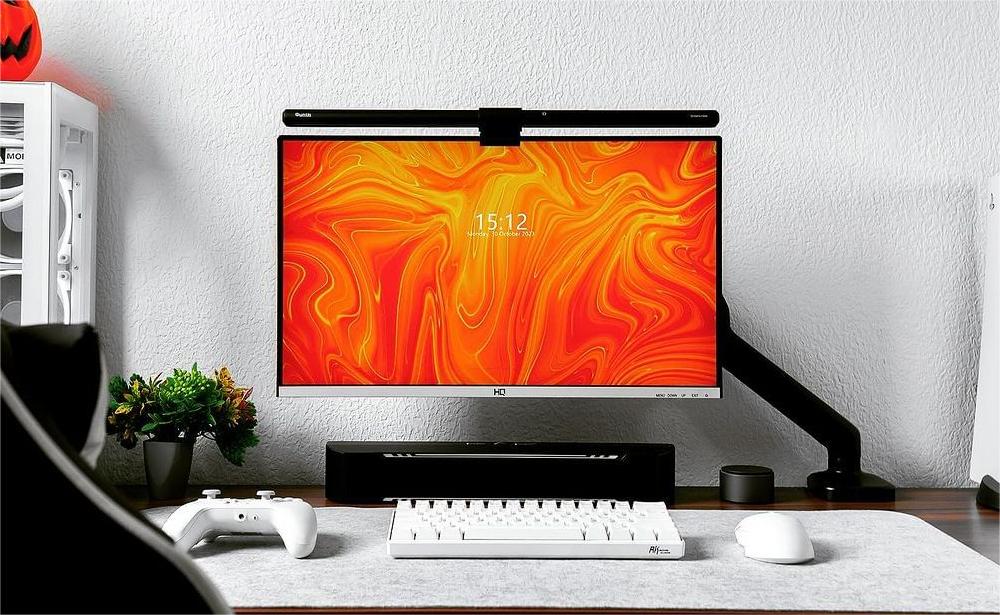
Quntis monitor light bars are designed around where light lands. Their asymmetric optical design directs useful illumination toward the keyboard, documents, and primary work surface while limiting light directed toward the display.
Positioned above the monitor, the light source stays outside the direct line of sight, helping reduce direct glare. Keeping the beam away from the screen also helps reduce reflections caused by the lamp itself.
On models with rear ambient lighting, soft light around the display can help reduce the brightness gap between a bright screen and a dark room. Mounting structure, screen compatibility, and ambient-light availability vary by model.
The best light is not necessarily the most noticeable one. It is the light that supports sustained focus on what matters. Quntis is designed to control the light it introduces and help create a more balanced relationship between the screen, desk, and surrounding space. From monitor light bars to broader desktop lighting solutions, Quntis continues to explore how thoughtful lighting design can support work, learning, and creative tasks every day.
Stay Connected with Quntis
Thank you for your interest in Quntis and for taking the time to read the article. You can also connect with Quntis on social media for desk setup inspiration:
-
X (Twitter): https://x.com/QuntisO
-
Instagram: https://www.instagram.com/quntisofficial/
-
YouTube: https://www.youtube.com/@Quntis
- Reddit: https://www.reddit.com/r/Quntis/
- Find Your Light for your setup here


