
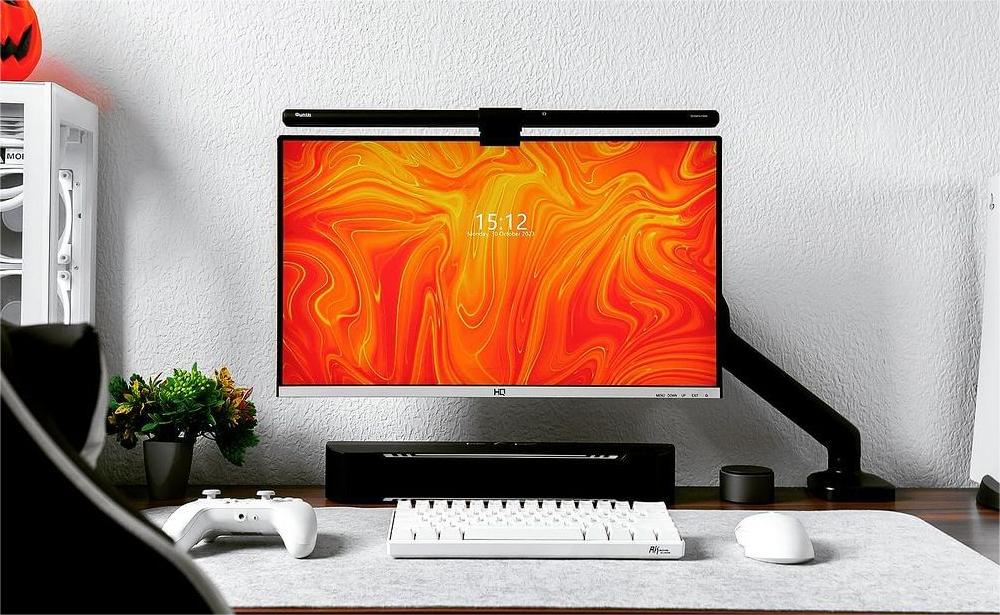

Your screen is only part of the task. There is also the notebook beside your keyboard, the printed page and the unfinished sketch. The Quntis Monitor Light Bar Focus 40 cm (15.7 inch) Black brings adjustable front lighting to that work, with touch controls and automatic or manual brightness adjustment.
At a glance: 17‒27-inch curved or flat monitors · 0.3‒8 cm (0.12‒3.15 inch) screen thickness · Touch controls · 5 V / 1 A USB power
On this page:
01 · EVERYDAY USE
Made for the Work Around Your Screen
Keep Paperwork Within Reach
A checklist sits beside your keyboard while you check details on screen. Add a notebook and the desk fills up quickly. The monitor-mounted Focus 40 cm lights the work in front of you without adding a lamp base.
Make Time for Evening Study
After work, an online lesson replaces the spreadsheet. Your workbook stays open beside it. Choose your preferred brightness and white-light setting for the exercises, or activate automatic dimming when you want the light to respond to its surroundings.
Look More Closely at a Creative Project
A reference image on screen and a pencil sketch give your desk another purpose. Adjust the light over your paper. For projects involving color, the model’s specified Ra 98 color rendering index is another feature to consider.
02 · MAKE IT YOURS
Features & Controls
Four buttons on the bar control power, brightness, color temperature and automatic dimming. A separate sensor detects surrounding light. This model provides front lighting only.
Choose Your Brightness and White Light
Tap for a preset, or touch and hold to adjust between the presets. Choose the brightness and white-light tone that suit your desk and preferences.
| What you want to do | How to do it |
|---|---|
| Turn the light on or off | Tap the On/Off button. |
| Select a brightness preset | Tap the Brightness button to cycle through 5%, 15%, 40%, 70% and 100%. |
| Adjust brightness continuously | Touch and hold the Brightness button. |
| Select a color-temperature preset | Tap the Color Temperature button to cycle through 3000 K, 4000 K, 5000 K and 6500 K. |
| Adjust color temperature continuously | Touch and hold the Color Temperature button to adjust within 3000 K‒6500 K. |
| Activate automatic dimming | Tap the Auto Dimming button to let the light adjust its brightness in response to surrounding light. |
Set a Two-Hour Timer
For a timed study or work session, touch and hold the On/Off button for 3 seconds, until the light flashes once. This activates the two-hour timer.
During the countdown, touch and hold that button again until the light flashes once to restart the full two hours. Tapping the On/Off button to turn the lamp off also cancels the timer.
Return to Your Previous Settings
The memory function automatically restores your last brightness and color-temperature settings when power is reconnected. There is no separate activation step.
03 · INSTALLATION
Set Up Your Light
- Assemble the bar. Slide the light bar into the clip and plug in the supplied USB-C cable.
- Position it on your monitor. Adjust the clip and lighting angle, then mount the lamp according to the diagrams for your monitor’s shape. Check both screen thickness and the mounting area.
- Fine-tune the clip if needed. Remove the clip cover, use the included hex key to tighten or loosen the locking screw, then replace the cover.
- Connect suitable power. Use a 5 V USB source rated for at least 1 A. Adjust the light bar’s angle for the desk area you want to illuminate.
04 · YOUR QUESTIONS, ANSWERED
Frequently Asked Questions
Will It Fit My Monitor?
The specified range is 17‒27 inch curved or flat monitors, with a screen thickness of 0.3‒8 cm. Check the top and rear mounting area against the installation diagrams; screen size alone does not establish compatibility.
Can I Adjust Brightness Myself or Use Automatic Dimming?
Yes. Use the Brightness button for presets or continuous adjustment. Tap the separate Auto Dimming button to activate sensor-based brightness adjustment.
Can I Use It With an External Webcam?
Webcam mounting is supported through an optional accessory. Check the accessory’s compatibility with your camera and this light bar before ordering.
Does It Have a Remote or Support Multi-Light Control?
No. This model uses touch controls and does not support multi-light control. Compare a model that explicitly supports it if this feature is essential to your setup.
How Do I Restart or Cancel the Timer?
During the countdown, hold the On/Off button until the light flashes once to restart two hours. Tap the button to switch the lamp off and cancel the timer.
Why Is the Light Flashing During Use?
Insufficient power can cause flashing. Check that your USB source provides 5 V and at least 1 A, or try another suitable USB port. A single flash while setting the timer is its confirmation signal.
05 · THE DETAILS
Specifications & User Manual
View the full specifications
| Specification | Details |
|---|---|
| Product | Quntis Monitor Light Bar Focus 40 cm (15.7 inch) Black |
| Model number | LI-HY-0205-BK |
| Variant code | F40BK |
| Length | 40 cm (15.7 inch) |
| Color | Black |
| Control | Touch |
| Color rendering index | Ra 98 |
| Color temperature | 3000 K‒6500 K |
| Center illuminance | 900 lux |
| Screen compatibility | 17‒27-inch curved / flat monitors |
| Screen thickness | 0.3‒8 cm (0.12‒3.15 inch) |
| Dimming | Auto dimming and stepless dimming |
| Brightness presets | 5% / 15% / 40% / 70% / 100% |
| Color-temperature presets | 3000 K / 4000 K / 5000 K / 6500 K |
| Anti-blue light | Yes |
| Material | Aluminum + ABS |
| Mounting | Mounts on monitor |
| Lighting configuration | Front light only |
| Timer | 2 hours |
| Memory | Last brightness and color-temperature settings restored when power is reconnected |
| Multi-light control | Not supported |
| Webcam mounting | Via optional accessory |
| Power | 5 W |
| Input | 5 V / 1 A |
| Luminous flux | More than 230 lm |
| Light bar dimensions | 40 × 2 × 2 cm |
| Cable length | 180 cm (70.8 inch) |
In the box: One light bar, one clip, one USB-C cable, one hex key and one user manual.
06 · FIND YOUR FIT
Is This the Right Light for Your Setup?
Choose the Focus 40 cm for front lighting, touch controls and automatic or manual adjustment. Confirm monitor size, thickness, mounting space and USB power before ordering. If mounting a webcam with the light, check the optional accessory. For remote control, rear lighting or multi-light control, compare other models.
Explore the Quntis Monitor Light Bar Focus 40 cm (15.7 inch) Black →