
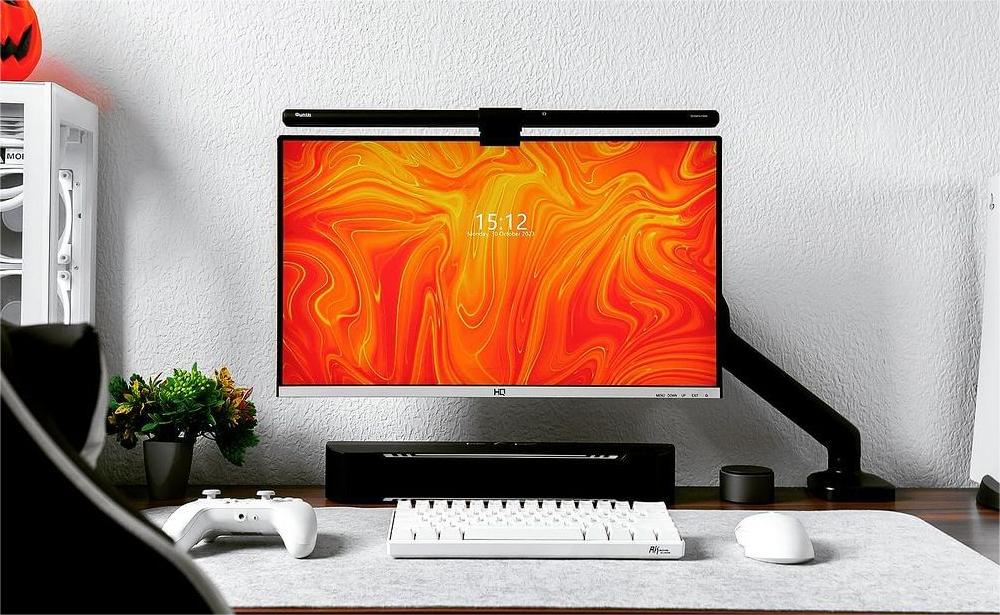

A desk can be practical and still feel like your own. The Quntis Monitor Light Bar IM 40 cm (15.7 inch) Black combines front lighting for the desktop with RGB backlighting behind the monitor. Separate touch controls let you adjust the front light for what is in front of you, then choose a backlight mode to suit the setup.
At a glance: 17‒27 inch flat monitors · Monitor thickness up to 6 cm (2.36 inch) · Front light + RGB backlight · On-bar touch controls · 5 V / 1 A USB power
On this page:
01 · EVERYDAY USE
Desk Setups That Make the Most of IM
A Compact Gaming Desk With a Color Theme
One monitor, a keyboard and a mouse mat can be enough to make a gaming space feel complete. Set the front light for the desktop, then tap through the RGB backlight modes to find a look that works with your peripherals. Mounting the bar above the screen leaves room below for your mouse movements, controller or a drink coaster.
A Small Streaming Corner That Feels Like Yours
A microphone arm, headphones and a few favorite objects give your streaming corner its identity. Use IM’s backlight to add color to the wall behind the monitor while keeping a separate front-light setting for the desk. When you want a different look, reach for the RGB control at the end of the bar and select another mode.
A Keyboard-Building Session Before You Log On
Before the game starts, the desk might hold a keycap tray, a switch puller and a half-finished keyboard. Use the adjustable front light while you work, with the RGB backlight switched off if you prefer. Once the keyboard is ready, turn the backlight on and choose a mode to complement the finished setup.
02 · MAKE IT YOURS
Features & Controls
There are two touch controls, one at each end of the light bar. The power-symbol control operates the front light; the RGB control operates the backlight. Their gestures are different.
Set the Front Light for the Desktop
Choose from five brightness levels: 20%, 40%, 60%, 80% and 100%, and change the white-light tone within 3000 K‒6500 K. A warmer setting may suit a relaxed evening; a cooler setting gives the desk a different white-light appearance.
| What you want to do | How to do it |
|---|---|
| Turn the front light on or off | Tap the power-symbol control. |
| Change front-light brightness | Double-tap the power-symbol control to move between the five levels: 20%, 40%, 60%, 80% and 100%. |
| Change front-light color temperature | Touch and hold the power-symbol control. |
Brightness and color temperature are separate adjustments: double-tap for brightness, hold for the white-light tone.
Choose the Atmosphere Behind the Monitor
The backlight offers 24 modes: 9 static colors and 15 dynamic modes. The static options include warm white and cool white. Use the RGB control to browse the modes manually and choose the one you want.
| What you want to do | How to do it |
|---|---|
| Turn the backlight on | Tap the RGB control. |
| Change the backlight mode | With the backlight on, tap RGB again; keep tapping to cycle through the modes. |
| Turn the backlight off | Touch and hold RGB. |
Tapping RGB changes the mode; holding it switches the backlight off. The front light has its own on/off control, so you can use the front light, the backlight or both together.
Return to Your Saved Settings
IM remembers the front light’s brightness and color temperature and the backlight’s RGB mode when you switch the lights off. Those settings are also saved through a power interruption or after unplugging and reconnecting the USB cable.
When power returns, the lights stay off until you turn them on. Tap the front-light power control to restore the front light at its saved brightness and color temperature. Tap RGB to turn the backlight on in its saved mode.
Keep the Controls on the Bar
IM 40 cm uses direct touch control on the light itself. It has no remote control and does not support multi-light control. If you use more than one IM 40 cm, operate each bar separately.
03 · INSTALLATION
Set Up Your Light
Before mounting, check for a 17‒27 inch flat display with a monitor thickness of up to 6 cm (2.36 inch). The shape of the monitor’s top and rear also matters; compare it with the installation diagrams in the manual.
- Fit the bar and clip. Adjust the light-bar angle and clip to suit the monitor, then position the bar on its top edge.
- Fine-tune the clip if needed. Remove the clip’s screw cover, use the supplied hex key to tighten or loosen the locking screw, then replace the cover. Confirm the light sits securely before use.
- Connect USB power. Connect the supplied 1.5 m USB-C cable to a 5 V USB source rated for at least 1 A.
- Switch on and set the lighting. Adjust the bar’s angle toward the desk area you want to illuminate, then use the separate front-light and RGB controls to turn on the lights you want and choose your settings. After reconnecting USB power, switch each light on manually to use its saved settings.
The manual’s “curved-back monitor” illustration describes the shape of a monitor’s rear housing. This model’s specified screen compatibility remains flat monitors.
04 · YOUR QUESTIONS, ANSWERED
Frequently Asked Questions
Will It Fit a Curved Monitor?
This model is specified for 17‒27 inch flat monitors, with a monitor thickness up to 6 cm (2.36 inch). For a curved display, choose a model explicitly listed as compatible with curved monitors. Also check the top and rear housing shape before ordering.
Can I Use the Front Light Without the RGB Backlight?
Yes. The front light and backlight have separate touch controls. Hold RGB to switch the backlight off while leaving the front light on, or tap the front-light power control to turn the front light off while keeping the backlight on.
Does It Include a Remote or Support One Remote for Several Bars?
No. IM 40 cm is controlled on the bar itself and does not support multi-light control. Each unit is operated separately.
Can I Use a Webcam With It?
Webcam compatibility is supported through an optional accessory, which is not listed among the supplied items. Check the accessory and your monitor’s camera position before choosing the arrangement.
Will It Remember My Settings After I Unplug It?
Yes. It saves the front light’s brightness and color temperature and the backlight’s RGB mode, including after a power interruption or USB disconnection. The lights do not turn on automatically when power returns. Turn on the front light and backlight separately with their touch controls to use their saved settings.
What Power Source Do I Need?
Use a 5 V USB source rated for at least 1 A. The supplied cable is 1.5 m long. A wall power adapter is not listed in the package contents, so check that you have a suitable USB source available.
If the light flashes, insufficient power may be the cause. Try a different USB port or source with adequate 5 V / 1 A output. If the issue continues, use the Quntis Support Hub or contact support through your original purchase platform.
05 · THE DETAILS
Specifications & User Manual
View the full specifications
| Specification | Details |
|---|---|
| Product | Quntis Monitor Light Bar IM 40 cm (15.7 inch) Black |
| Model number | LI-HY-0201-BK |
| Variant code | I40BK |
| Light-bar length | 40 cm (15.7 inch) |
| Finish | Black |
| Control method | On-bar touch control |
| Lighting type | Front light + RGB backlight |
| Compatible monitor type | Flat monitors |
| Compatible monitor size | 43‒69 cm (17‒27 inch) |
| Compatible monitor thickness | Up to 6 cm (2.36 inch) |
| Mounting | Mounts on the monitor’s top edge |
| Front-light brightness | Five levels: 20%, 40%, 60%, 80%, 100%; double-tap to adjust |
| Front-light color temperature | 3000 K‒6500 K; touch and hold to adjust |
| Backlight modes | 24 modes: 9 static colors + 15 dynamic modes; selected using the RGB control |
| Independent front/back switching | Yes |
| Settings memory | Front-light brightness and color temperature, plus RGB backlight mode; retained after switching off or losing USB power |
| After power is restored | Lights remain off until manually switched on; saved settings are then used |
| Remote control | No |
| Multi-light control | No |
| Color rendering index (CRI) | Ra 95 |
| Center illuminance | 900 lux |
| Anti-blue light | Yes |
| Material | Aluminum + ABS |
| Webcam compatibility | Supported via optional accessory |
| Power | 5 W |
| Input | 5 V / 1 A |
| Light output | >235 lm |
| Light-bar shape | Straight |
| USB cable length | 1.5 m |
| Light source | LED |
| Warranty | 1 year |
In the box: One light bar, one hex key, one 1.5 m USB-C cable and one user manual.
View the user manual → IM 40 cm Black
06 · FIND YOUR FIT
Is This the Right Light for Your Setup?
Choose IM 40 cm if you have a compatible flat monitor and want front lighting plus an RGB backlight, with simple controls on the bar. It suits a desk where the light’s ends are easy to reach. Before ordering, check the monitor’s top and rear shape, its thickness and your USB power source. If you need a remote, multi-light control or curved-screen compatibility, compare models with those features before choosing.
Explore the Quntis Monitor Light Bar IM 40 cm (15.7 inch) Black →