
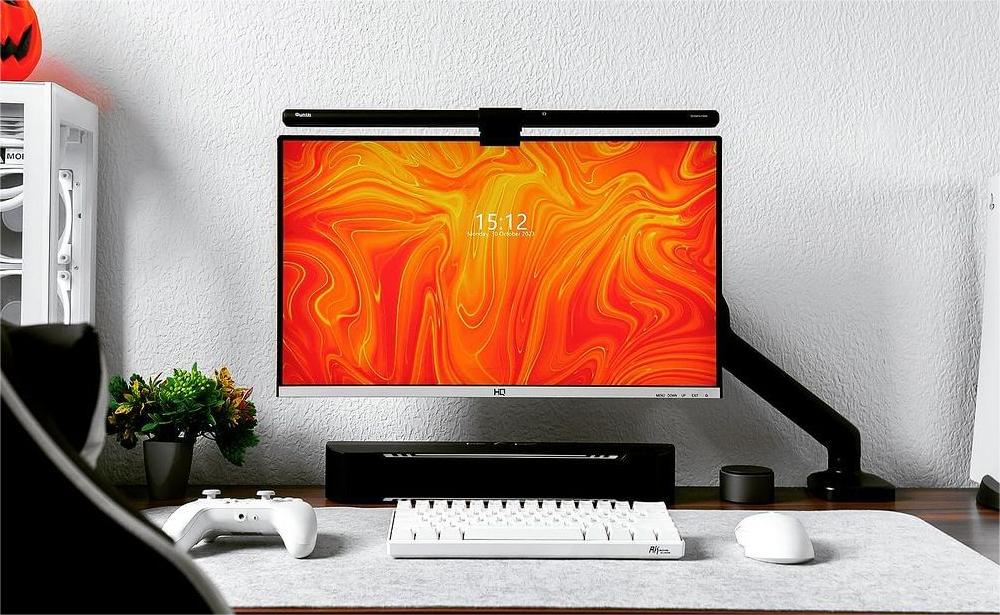

Your monitor, keyboard and desk accessories set the tone for a space you use every day. The Quntis Monitor Light Bar Glow 41 cm (16.1 inch) combines front lighting for the desktop with adjustable white backlighting behind your monitor. Choose Grey, Pink or White, then use the wireless remote to change the lighting without reaching over the screen.
At a glance: 17‒27 inch curved or flat monitors · 0.3‒7 cm (0.12‒2.76 inch) monitor thickness · Front light + adjustable white backlight · Wireless remote · 5 V / 1.5 A USB power
On this page:
01 · EVERYDAY USE
Desk Setups That Make the Most of Glow
A Coordinated Desk With Soft Backlighting
A single monitor sits against a light-colored wall, with a matching keyboard and desk mat and a few favorite objects nearby. Glow’s front light illuminates the desktop while its adjustable backlight adds a soft white wash behind the screen. Choose Grey, Pink or White to complement the setup, and keep the remote beside your keyboard for easy adjustments.
A Work Corner That Shares the Living Room
The workday ends, but your monitor stays in the room where you spend the evening. Switch off the front light and leave a warm-white backlight on against the wall. When you return to the desk, turn the front light on again. Separate controls let that small work corner change its lighting as the room changes use.
Two Screens, Different Finishes, One Remote
One screen handles your main work; the other holds a reference document or a personal project. Perhaps a Grey light bar suits one side of the desk while Pink or White suits the other. You can pair both Glow 41 cm bars with one compatible remote, including different finishes, and keep brightness and white-light adjustments within reach.
02 · FIND YOUR FINISH
Choose the Color That Feels at Home on Your Desk
Grey, Pink and White share the same core lighting features and controls. Choose the finish that works with your monitor, keyboard and surroundings.
Quntis Monitor Light Bar Glow 41 cm (16.1 inch) Grey
Pair it with graphite keyboards, darker monitors or a mix of metal and wood for an understated workspace.
Explore Grey →Quntis Monitor Light Bar Glow 41 cm (16.1 inch) Pink
Add a color accent to a desk with pale wood, pastel accessories or a favorite matching keyboard.
Explore Pink →Quntis Monitor Light Bar Glow 41 cm (16.1 inch) White
Bring it into a setup with white peripherals, light surfaces or natural wood for a coordinated look.
Explore White →03 · MAKE IT YOURS
Features & Controls
The wireless tabletop remote has separate front-light and backlight buttons. Brightness and Color Temperature buttons select what you want to adjust; the + and − buttons make the change.
Adjust the Front Light for the Task
Use a preset for a quick change, or hold a button to adjust continuously.
| What you want to do | How to do it |
|---|---|
| Switch the front light on or off | Tap the central On/Off button. |
| Choose a brightness preset | Tap Brightness (sun icon), then tap + / − to select 10%, 50%, 75% or 100%. |
| Adjust brightness continuously | Tap Brightness, then hold + or −. |
| Choose a color-temperature preset | Tap Color Temperature (thermometer icon), then tap + / − to select 3000 K, 4000 K, 5000 K or 6500 K. |
| Adjust color temperature continuously | Tap Color Temperature, then hold + or − within the 3000 K‒6500 K range. |
Give the Backlight Its Own Setting
Use the smaller Backlight button below the central On/Off button. Its gestures differ from the front-light controls.
| What you want to do | How to do it |
|---|---|
| Switch the backlight on or off | Tap Backlight. |
| Adjust backlight brightness continuously | Touch and hold Backlight. |
| Change the backlight’s white-light tone | Double-tap Backlight to cycle through 3000 K, 4000 K, 5000 K and 6500 K. |
The front light and backlight can be switched separately. Use both while working, or keep the backlight on by itself when that suits your setup.
Return to Your Previous Settings
The lamp remembers the last brightness and color-temperature settings and restores them when USB power is reconnected. There is no separate memory button to activate. Except for the On/Off indicator, the remote’s button indicators turn off after 10 seconds; this does not turn the lamp off.
One Remote, Multiple Glow 41 cm Light Bars
One compatible remote can control multiple Glow 41 cm light bars, including a mix of Grey, Pink and White. These are color variants of the same product. Multi-light control does not support a mix of different light-bar models.
The supplied remote is already paired with its light bar. To re-pair it, replace a remote or connect additional matching light bars:
- Restart the light bar. Unplug its USB power, then reconnect it.
- Start pairing within 12 seconds. Touch and hold the remote’s central On/Off button for about 4 seconds.
- Check the confirmation. The front light blinks when pairing succeeds. Once it stops blinking, test brightness or color-temperature adjustment with the remote.
- Add another Glow 41 cm light bar. Repeat the procedure for each additional unit using the same remote; Grey, Pink and White can be paired together.
To unpair: With the light on, hold the Brightness button (sun icon) for about 7 seconds. The front light flashes to confirm.
04 · INSTALLATION
Set Up Your Light
- Assemble the bar. Slide the light bar into its clip and connect the supplied USB-C cable.
- Fit the clip. Extend or shorten its horizontal section to suit your monitor. Check the monitor’s top and back against the installation diagrams, including space for your webcam if you use one.
- Position the light. Mount it on the monitor and adjust the bar’s angle for the desk area you want to illuminate.
- Power the bar and remote. Use a 5 V USB source rated for at least 1.5 A. Press and twist the remote’s bottom cover to the unlock mark, insert the three AA batteries with the correct polarity, and twist the cover back to lock it.
The AA batteries power the remote; the light bar uses USB power.
05 · YOUR QUESTIONS, ANSWERED
Frequently Asked Questions
Will It Fit My Monitor?
The specified fit is 17‒27-inch curved or flat monitors with a thickness of 0.3‒7 cm. Check the top and rear mounting area against the manual diagrams, especially with unusual monitor shapes or an existing webcam.
Do Grey, Pink and White Have Different Lighting Features?
They share the same core lighting features and remote-control operations. Choose by finish, then check the corresponding model and manual in the table below.
Can I Use the Backlight Without the Front Light?
Yes. The remote has separate front-light and backlight buttons, so you can switch either light on or off independently.
How Are the Lamp and Remote Powered?
The light bar requires 5 V / 1.5 A USB power. The remote uses three included AA batteries.
Can One Remote Control More Than One Light Bar?
Yes. Pair a compatible remote to each Glow 41 cm bar using the steps above. You can combine Grey, Pink and White finishes; this does not extend to different light-bar models.
Why Is the Light Flashing?
Flashing during ordinary use can indicate insufficient power; check for a 5 V USB source rated for at least 1.5 A. The front light also flashes as confirmation during pairing or unpairing.
06 · THE DETAILS
Specifications & User Manuals
View the full specifications
| Shared specification | Details |
|---|---|
| Product family | Quntis Monitor Light Bar Glow 41 cm (16.1 inch) |
| Finishes | Grey / Pink / White |
| Length | 41 cm (16.1 inch) |
| Light bar dimensions | 20 × 410 mm |
| Shape | Straight |
| Lighting | Front light + adjustable white backlight |
| Control | Wireless remote |
| Front-light brightness | 10% / 50% / 75% / 100% presets; continuous adjustment |
| Backlight brightness | Continuous adjustment |
| Color temperature | 3000 K‒6500 K |
| Color-temperature presets | 3000 K / 4000 K / 5000 K / 6500 K for front light and backlight |
| Color rendering index | Ra 95 |
| Center illuminance | 900 lux |
| Specified backlight illuminance | 300 lux |
| Monitor compatibility | 17‒27-inch (43‒69 cm) curved / flat monitors |
| Monitor thickness | 0.3‒7 cm (0.12‒2.76 inch) |
| Mounting | Mounts on monitor |
| Webcam compatibility | Webcam friendly; check clearance for your webcam and monitor |
| Multi-light control | Supported across Grey, Pink and White variants of Glow 41 cm with a compatible remote |
| Memory | Last brightness and color-temperature settings restored when power is reconnected |
| Anti-blue light | Yes |
| Material | Aluminum + ABS |
| Power | 7.5 W |
| Input | 5 V / 1.5 A |
| Luminous flux | More than 255 lm |
| USB-C cable length | 1.8 m (70.8 inch) |
| Remote batteries | 3 × AA |
| Remote dimensions | 8.3 cm diameter × 2.6 cm high |
| Warranty | 1 year |
| Finish | Model number | Variant code | User manual |
|---|---|---|---|
| Grey | LI-HY-0214-GY | G41GY | Grey manual |
| Pink | LI-HY-0214-PK | G41PK | Pink manual |
| White | LI-HY-0214-WT | G41WT | White manual |
In the box: One light bar, one clip, one remote control, three AA batteries, one USB-C cable and one user manual.
07 · FIND YOUR FIT
Is This the Right Light for Your Setup?
Choose Glow 41 cm if you want desk lighting and adjustable backlighting with a remote close at hand. Grey, Pink and White give you a choice of finish with shared core features. Before ordering, check monitor thickness, the mounting area and your USB power source. For a multi-monitor desk, pair your Glow 41 cm bars and choose the finishes you prefer.
Choose your finish: Explore Grey · Explore Pink · Explore White